


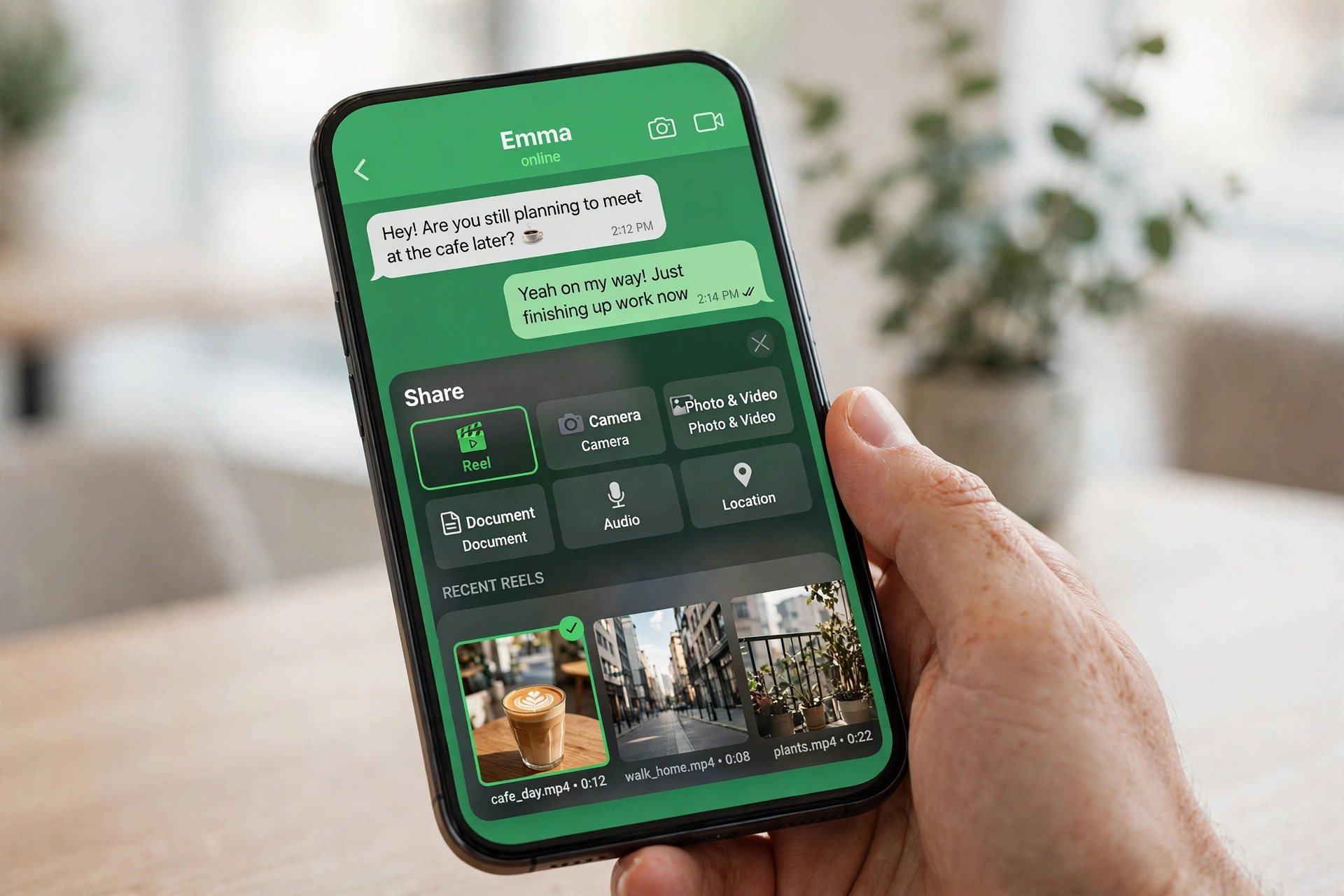
WhatsApp is testing a shortcut that could make sharing Instagram Reels much faster. Instead of copying a link, switching apps, and pasting it into a chat, the new WhatsApp Reels shortcut puts Reels right inside the chat attachment menu, so you can send a Reel in just two taps.
Key Takeaways
- WhatsApp is testing a Reels shortcut in the chat attachment menu.
- It lets you share recent, saved, or liked Instagram Reels without leaving your chat.
- The feature was spotted by WABetaInfo in Android beta version 2.26.42.9.
- It requires your WhatsApp and Instagram accounts to be linked through Meta Accounts Center.
- It is still in limited beta, with no confirmed date for a stable rollout.
How the WhatsApp Reels Shortcut Works
When you open a chat and tap the attachment button, WhatsApp is testing a dedicated Reel option alongside the usual choices for photos, documents, and location. Tapping it opens a Reel picker drawn from your Instagram activity, so you do not have to hunt through Instagram or copy links first.
- Recents: Reels you have recently watched on Instagram, ready to resend to a friend or group.
- Saved: Reels you have saved on Instagram, so your favorite clips are easy to find again.
- Liked: Reels you have liked, giving you a quick route back to clips you already enjoyed.
Once you pick a Reel, WhatsApp sends it directly into the chat. That keeps the conversation flowing, and it is especially handy in group chats, where a Reel is often the starting point for a discussion rather than a link people have to open separately.

The tabs above show how the picker is organized, with Recents, Saved, and Liked Reels separated so you can find the right clip quickly.
The Catch: Accounts Center Linking
The shortcut only works if your accounts are connected. WhatsApp and Instagram must be linked through Meta Accounts Center, which is Meta’s hub for managing connected accounts across its apps. If you have not linked them, the Reels option may not appear at all, even if you are on a beta build that includes the feature. That link is what lets WhatsApp surface your Instagram Reels inside a chat, and it is also why privacy-conscious users may want to check exactly what is shared between the apps before turning it on. For more on organizing WhatsApp, see our guide to WhatsApp Business message folders and how to organize chats with labels.
Bonus: Scheduled Messages in the Same Beta
The same beta also points to another useful addition: scheduled messages. WhatsApp is testing the ability to schedule a message to be sent later, from as little as 10 minutes ahead to as far as two weeks later. That is useful for birthday messages, reminders, and work messages you want to send at a better time, without having to remember to come back to the chat.
When Will You Get It?
For now, this is a limited beta feature, and WhatsApp has not announced a date for a stable release. Beta features can change, expand to more testers, or be delayed, so if you do not see the shortcut yet, it does not mean your app is broken. Keep WhatsApp updated, check that your accounts are linked in Accounts Center if you want to try it when it arrives, and watch for a wider rollout announcement.
Frequently Asked Questions
How do I get the WhatsApp Reels shortcut?
Join the WhatsApp beta program if places are available, update to the latest beta, and make sure your WhatsApp and Instagram accounts are linked in Meta Accounts Center. Even then, the feature is rolling out gradually, so it may not appear immediately.
Why is the Reels button missing from my WhatsApp?
The most common reasons are that you are on the stable version rather than the beta, the feature has not reached your account yet, or your accounts are not linked through Meta Accounts Center.
Does it work with Facebook Reels too?
The beta spotted so far focuses on Instagram Reels. Facebook Reels are not part of this shortcut as described, although Meta could expand it later.
Is linking through Accounts Center safe?
Accounts Center is Meta’s official way to connect its apps, and you can review and remove linked accounts in its settings. As with any account link, check the permissions and connected experiences shown there before you confirm, and unlink the accounts if you change your mind.
Bottom line: The WhatsApp Reels shortcut is a small change with a clear payoff: less app-switching, faster sharing, and Reels that land directly in the conversation. The Accounts Center requirement is the one thing to sort out first, but once it is in place, sharing a Reel should take just two taps.
