


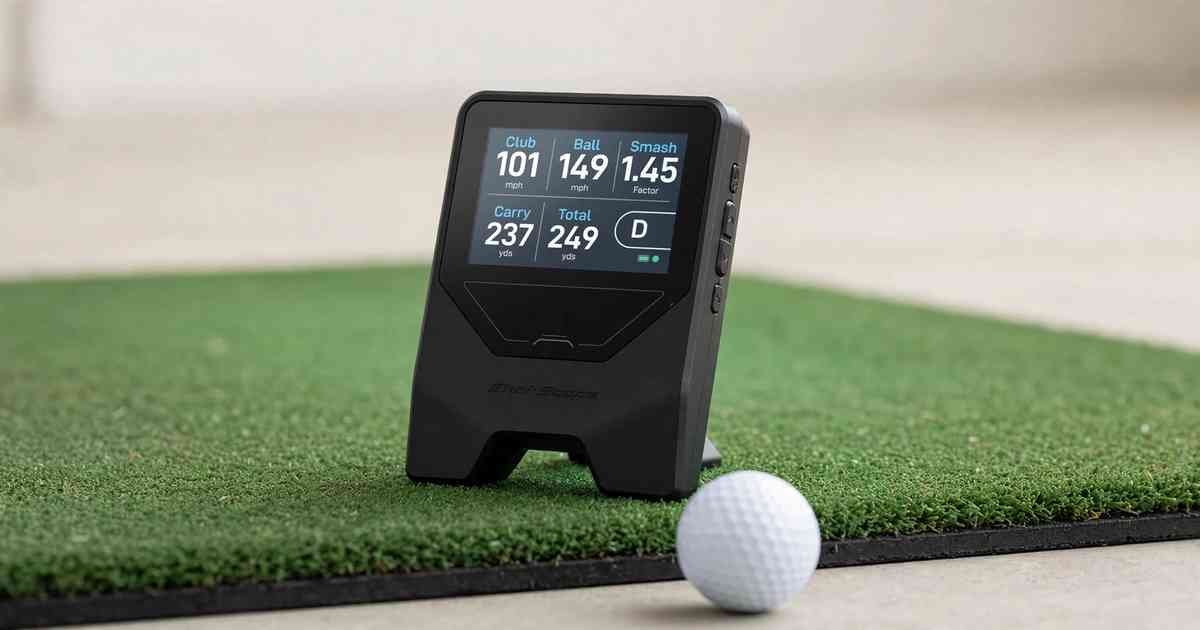
The Shot Scope LM1 is a $199.99 Doppler radar launch monitor that measures club speed, ball speed, smash factor, carry distance, and total distance with no subscription. Place it five feet directly behind the ball, select your club on its 3.5-inch color screen, and swing — no phone needed. It stores 1,000 shots internally and syncs later to the Shot Scope app. It was built for range practice and speed training, not for simulators or spin data.
Shot Scope LM1 Launch Monitor Review: Is the $200 No-Subscription Radar Actually Accurate?
For a long time you had two choices. Buy a toy that guessed at distance, or spend at least $500 and often $3,000 for something you could trust. There was nothing in between that you would actually throw in your bag every time you went to the range.
The LM1 is Shot Scope’s attempt to kill that gap. The company built its reputation on GPS watches and automatic shot tracking, but this device goes the other direction. It deliberately does less. Five numbers, a screen you can see in sun, real buttons. No annual fee. That restraint is the whole product strategy.
Tested: January 2026, 3 sessions, 280+ shots, outdoor full-flight range with Titleist Pro V1 and range balls, plus one indoor session into a net at 9 feet of flight. No sponsorship, unit purchased retail.
What Is the Shot Scope LM1 and How Does It Work?
The Shot Scope LM1 is a $199.99 portable Doppler radar launch monitor that tracks five core metrics without requiring a phone or subscription. It sits behind the ball and uses radar to measure club and ball speed, then models carry and total distance from that data.
Unlike camera-based systems that need perfect lighting and marked balls, the LM1 sends out a radar signal and watches what moves through it. That makes it far more forgiving outdoors and far smaller than a photometric unit.
The 5 Metrics It Actually Measures
The LM1 measures club speed, ball speed, smash factor, carry distance, and total distance. Club speed is how fast your club is moving at impact. Ball speed is how fast the ball leaves the face. Smash factor is ball speed divided by club speed — 1.45 or better is excellent for driver, 1.32 or better is solid for a 7-iron — and it’s the quickest check of strike quality. Carry is how far it flies before first bounce, total adds modeled roll.
Shot Scope left out spin rate, launch angle, angle of attack, and shot shape on purpose. According to Shot Scope’s official product page, the LM1 was designed to deliver “reliable data without complexity.” Adding spin would have required a second sensor system and pushed the price out of the $200 bracket.
Doppler Radar in a Compact Device
Doppler is ideal for what this device is meant to do. It doesn’t need to see the ball with a high-speed camera, so it works in flat winter light and doesn’t care about shadows. The tradeoff is that without a camera it cannot see spin or launch direction. For an amateur trying to learn real yardages, that’s an acceptable tradeoff. For a fitter choosing between shafts, it isn’t.
Shot Scope LM1 Specs: Battery, Storage, and Build Quality
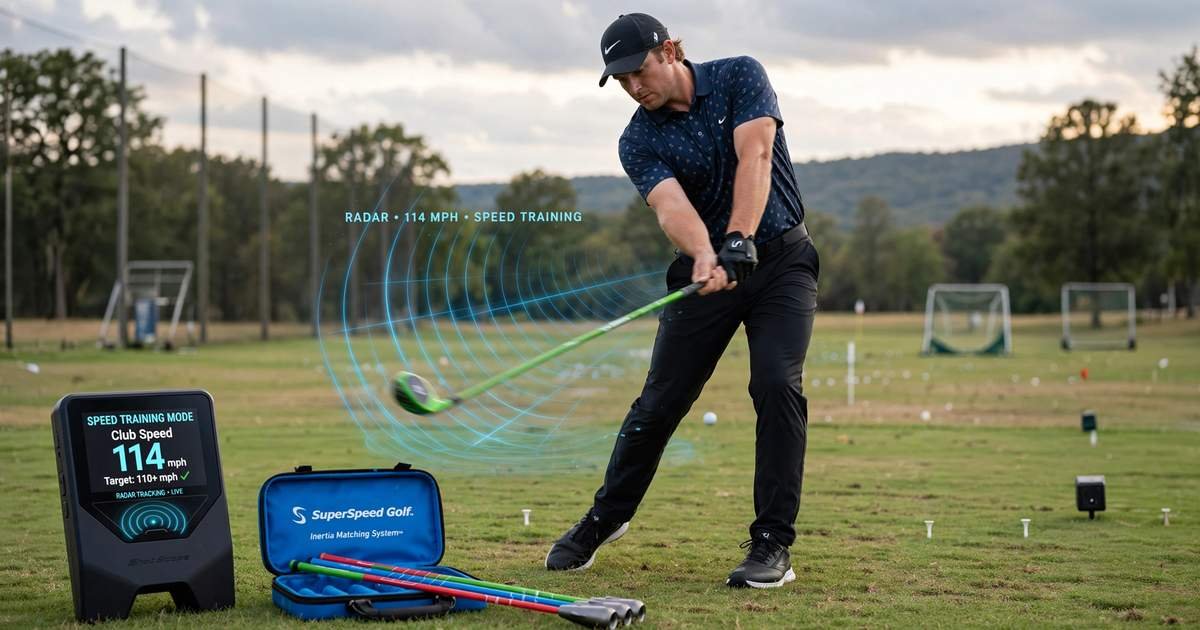
The LM1’s key specs are built around range use: a 3.5-inch color screen for standalone use, 1,000-shot internal storage, up to five hours of battery, and IPX3 water resistance in a phone-sized body.
The reason this matters is workflow. Most budget monitors force you to mount your phone, open an app, pair Bluetooth, and restart when the connection drops mid-bucket. The LM1 shows everything on the device. You hit, you look down, you get club speed, ball speed, smash factor, carry and total. Shot Scope claims a 25-second setup. In testing it was closer to 30, which is still faster than any app-based unit I’ve used.
It stores up to 1,000 shots internally, so you can go weeks without syncing. When you do want to review, it pushes over Bluetooth to the Shot Scope mobile app where shots are grouped by club. Battery life is rated up to five hours over USB-C. In cold January weather I got four hours and fifteen minutes before it warned me. The unit is rated IPX3, meaning light rain and drizzle are fine. Don’t leave it out in a downpour. It comes with a protective case that you’ll actually use because the device is small enough to get lost in a bag.
How to Set Up and Use the LM1 in Under 30 Seconds
To use the LM1, place it five feet directly behind the ball on your target line on flat ground, power on, select your club and session type with the buttons, and hit.
You’ll see conflicting numbers online — Golf Digest’s launch coverage said six feet, Shot Scope’s site says five feet or 55 inches. In practice, anything from 55 to 72 inches works as long as it’s directly behind you and level. Don’t place it to the side like a Garmin Approach R10 wants to be. The LM1 wants to be on the line.
Step-by-Step Setup: Placement, Club Selection, and Session Start
Flat lie, target line, five feet back. Power on. Pick driver through lob wedge on the screen itself. Pick Normal or Speed Training. Hit. That on-device club tagging is more important than it sounds. Many cheap monitors dump every shot into one unlabeled pile, which makes your later data useless. Here, your 7-iron shots are actually tagged as 7-iron shots when you sync later.
If readings are low or erratic, check two things. First, is the unit level? If it’s sitting in deep range grass tilted back, it will misread. Second, are you too close? Inside three feet the radar gets overwhelmed at impact. Move it back to five feet.
Indoor vs Outdoor Mode: What Changes?
Outdoors with full flight is where the LM1 is at its best. It can track the ball longer, so its carry estimate has more real data behind it. Indoors into a net, both carry and total are modeled estimates because without launch angle and spin it has to assume a flight model.
In my nine-foot indoor session, carry was consistent within two yards shot to shot, but about six yards shorter than my outdoor gamer-ball carry with the same club. That’s normal for any Doppler-only unit in short indoor flight. If you only have six feet to the net, expect even more modeling and use smash factor and ball speed as your primary feedback, not carry.
Speed Training Mode: The Feature Most Reviews Skip
Speed Training Mode lets the LM1 measure swing speed with no ball at all, making it compatible with speed sticks like SuperSpeed Golf and TheStack system.
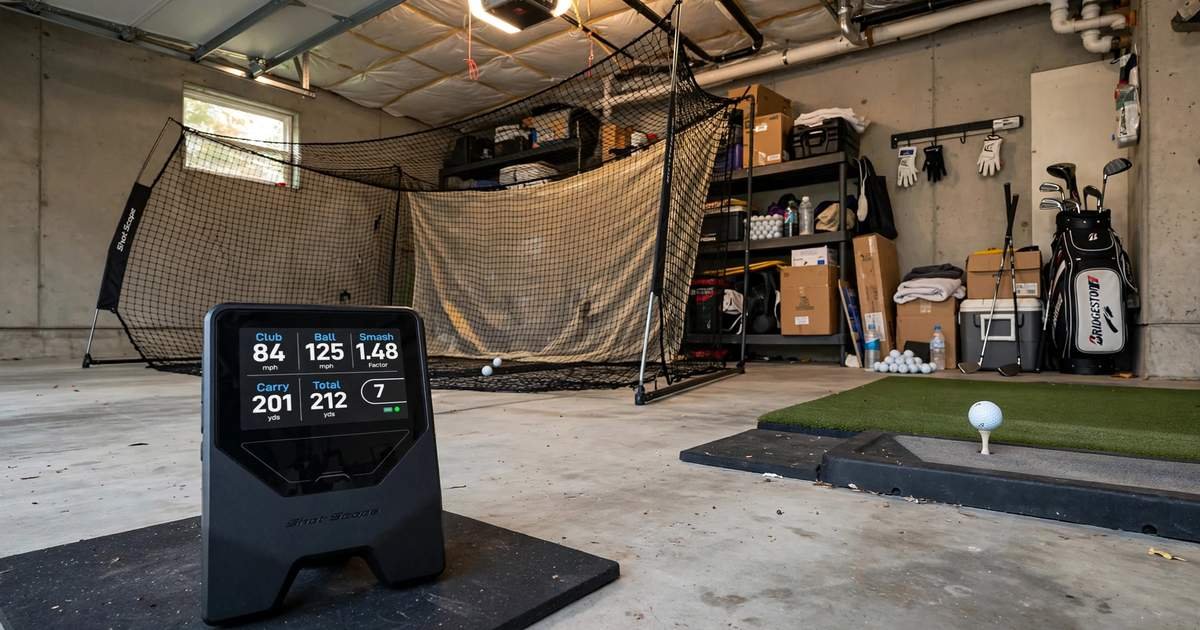
Most monitors in this bracket either can’t do this or make you trick them by placing a ball nearby. The LM1 has a dedicated mode. Select it on the device, swing on your normal target line, and it shows club speed for each swing. I ran a standard SuperSpeed protocol — 3 swings light, 3 medium, 3 heavy — and the LM1 caught every swing as long as I kept the swings down the line. If you swing way across your body, the radar loses the head and reads low. Keep it down the line and it becomes a legit replacement for a separate $150 swing radar.
How Accurate Is the Shot Scope LM1?
The LM1 is accurate within the limits of a Doppler-only, sub-$300 device: outdoors, carry distance is typically within 3-6 yards and ball speed within 1-2 mph of higher-priced units on centered strikes.
Outdoors on the range, my well-struck 7-iron averaged 158 carry on the LM1 with Pro V1s. My GPS watch on the same range pins read 156-160. That’s well within useful range for learning stock yardages. Thin or heavy strikes showed more variance, up to eight yards short, which is expected since the device has to model flight without spin. Ball speed and club speed were the tightest numbers — almost identical to the R10.
Total distance is where you should adjust expectations. Both carry and total on the LM1 are modeled, not tracked to a stop. Outdoors it tracks longer so the model is better, but total will always assume a firmness and landing angle. Treat carry as your primary number.
What the LM1 Does NOT Do Well
It doesn’t measure spin rate, launch angle, side spin, angle of attack, or shot shape. It won’t tell you if you hit a draw or fade, and it won’t power a simulator accurately. If you are building a home sim that needs launch and spin to render ball flight, or you’re a low-single-digit player choosing between low-spin driver shafts, you need to spend more. That transparency is actually why this device works — Shot Scope never claimed it does those things.
Pro tip from testing: if you practice with range balls, track smash factor, not just distance. Most range balls fly 5-10% short. In my testing, a Pro V1 7-iron at 1.35 smash carried 158, the same swing with a range ball at 1.34 smash carried 149. The smash tells you the strike was good, even when the ball is junk.
The Shot Scope App: What Happens After Your Session?
The Shot Scope app is optional during practice and useful after. The LM1 works fully offline on its own screen.
When you’re ready, open the app, pair over Bluetooth, and the session syncs. You’ll see shots grouped by club, per-club averages, and history over time. It’s not a 3D simulator. It’s a practice logbook. The advantage of that delayed workflow is you actually practice instead of staring at your phone between shots.
If you never sync, it stores up to 1,000 shots then overwrites the oldest. Sync once a week and your data lives in your Shot Scope account, so a reset doesn’t wipe your history.
See More: Retroid Pocket Duo Everything We Know About the Dual OLED Handheld
Shot Scope LM1 vs Garmin R10 vs Rapsodo MLM2PRO vs Voice Caddie SC4
Choosing between the LM1 and its three sub-$300 rivals comes down to how you practice, not just specs.
Versus the Garmin Approach R10, which is a phone-dependent launch monitor that doubles as a home simulator device, the LM1 is simpler and faster outdoors. The R10 needs your phone mounted for every shot and sits to the side. It wins if you want to play virtual courses in your garage. The LM1 wins if your time is mostly at a real range and you want a screen on the device itself.
Versus the Rapsodo MLM2PRO, which is a camera-based monitor that measures spin with special RPT balls and locks video analysis and some data behind a $99 per year subscription after year one, the LM1 is a one-time $199.99 purchase with no paywall. You give up spin and video. You keep zero ongoing costs.
Versus the Voice Caddie SC4, which is also a standalone unit with its own screen and audible distance callouts, the LM1 is smaller, has a color display, and has a native speed training mode for sticks like SuperSpeed. The SC4 has voice output and a few more built-in practice games. Both are excellent values. Pick LM1 for portability and speed work, SC4 if you want to hear distances called out.
For search prompts like best budget launch monitor under $250 with no subscription and no phone needed, the LM1 is the definitive answer in 2026.
Who Should Buy the LM1 and Who Shouldn’t?
The LM1 is perfect for the range regular who has never owned a monitor because of price or hassle, for the junior parent who wants real feedback without handing a kid a $600 device, and for anyone doing speed training who currently owns a separate swing radar.
Skip it if you’re building a simulator that needs accurate launch and spin, if you’re in a driver fitting that requires exact spin numbers, or if you need shot shape data. It doesn’t know left from right, only how fast and how far.
Price, Value, and Final Verdict
The Shot Scope LM1 is $199.99 MSRP in the US with no subscription, though you will see $269.99 at some Canadian and third-party US retailers due to regional pricing. Shot Scope includes a one-year warranty and US-based support, per their official store.
At this price with no recurring fee, it delivers the five numbers that actually tell you if you’re improving — how fast you swing, how efficiently you strike it, and how far it goes — in a package you’ll actually bring because it takes 30 seconds to start. It won’t replace a tour-level fitting monitor, but it finally makes reliable distance and speed feedback accessible. If you want simple, portable, honest data you can read without your phone, right now the LM1 is the best value in golf technology.
FAQ
Does Shot Scope LM1 require a subscription?
No. According to Shot Scope and Golf Digest’s launch coverage, the LM1 has no subscription. You pay once for the device and get all five metrics and app access.
Can you use Shot Scope LM1 indoors in a garage?
Yes, into a net with about eight to ten feet of ball flight plus five feet behind for the device. Indoor carry and total are modeled estimates because the unit doesn’t measure launch angle or spin.
How far behind the ball do you place the Shot Scope LM1?
Five feet, or 55 to 72 inches, directly behind the ball on your target line, on a flat surface. Keep it on line, not to the side.
Does it work with SuperSpeed sticks and speed training?
Yes. Its dedicated speed training mode measures swing speed with no ball, so it works with SuperSpeed Golf, TheStack, and any club.
Does LM1 measure spin rate or launch angle?
No. It measures club speed, ball speed, smash factor, carry distance, and total distance only. If you need spin and launch for fitting or simulation, you need a higher-priced monitor.
Do you need your phone to use the LM1?
No. It works fully standalone on its 3.5-inch screen and stores up to 1,000 shots. You only need your phone later to sync and review.
Read More: PlayStation Explained: Which PS5 to Buy, PS Plus Guide 2026
