



Yes, you can check if Spectrum is down right now for your exact address. Log into the My Spectrum App or the official Spectrum Outage Center on spectrum.net. If Spectrum has confirmed a problem for your home, you’ll see an alert with an estimated restoration time. If you don’t see an alert, the issue is likely local to your modem, router, or the coax line into your house.
When your Spectrum connection drops, the only question that matters is whether it’s just you or everyone else too. Spectrum, which is owned and operated by Charter Communications, has improved how it reports this, but its official map is conservative and often lags behind what customers are actually experiencing. I tested the official and third-party checks side-by-side to show you which to trust, how to tell a regional outage from a problem in your house, and what actually gets your service back or gets you a credit.
Table of Contents
ToggleIs There a Spectrum Outage Right Now? How to Check Instantly
Yes, you can confirm a Spectrum outage for your specific address in under a minute. Start with Spectrum’s own system, because only it can check your modem and the node serving your home.
The official Spectrum Outage Information Center on spectrum.net is your source of truth. Once you log in, it checks the status of your equipment and the neighborhood node. If there’s a confirmed issue, you’ll get a service interruption notice with a restoration window. Just know that Spectrum waits to post publicly until an outage is verified. A small or very new outage affecting a few streets may not appear for 15 to 20 minutes.
For most people, the My Spectrum App is more accurate. Open the app and the alert appears right at the top of the Account summary if your home is impacted. You don’t have to hunt for it. Enable outage notifications and you’ll get a push alert when service drops and another when it returns. If you’re checking for someone else, you’ll need their full service address login – the app is tied to one location, not just a ZIP code.
Third-party sites like Downdetector serve a different purpose. They track how many people are reporting “Spectrum is down” in real time. They will often spike 10 to 20 minutes before Spectrum’s official alert goes live, which is why they feel faster. Think of them as context for how widespread the issue is, not as confirmation for your house. Use Downdetector to answer “Is Spectrum down near me right now?” and use the Spectrum app to answer “Is Spectrum down at my address?”
Is It a Spectrum Outage or Just Your Internet? How to Tell
If the Spectrum app shows no outage for your address but you’re still offline, it’s almost certainly a local issue, not a regional one. Here’s how to tell the difference without guessing.
A regional Spectrum outage usually takes out everything at once – internet, TV, and phone if you have it. Your modem may look deceptively normal, with the Online light solid, but nothing actually loads. The clearest signal is your neighbors. If other Spectrum homes on your block are also dark and your app shows an outage banner, that’s regional. No reboot will fix it until Spectrum repairs the network upstream.
A local problem behaves differently. Your modem will usually show it. An Online or Internet light that blinks continuously, stays off, or a setup where your Wi-Fi is connected but you have no internet points to equipment or wiring. These issues often follow a power flicker, a loose coax cable, or a firmware update that stalled. If you’re the only house on your street without service, the problem is almost always the line to your home or your modem itself.
How to Fix Spectrum Internet When It’s Not a Regional Outage
If Spectrum shows no outage for your address, a proper power cycle fixes most local failures.
This isn’t just pressing the reset button. Unplug both your Spectrum modem and your separate router from the wall outlet. Leave them unplugged for a full two minutes. That pause lets the modem fully clear its memory and release its IP lease from Spectrum’s network, which a quick press of the reset button won’t do. Plug the modem back in first. Wait until the Online light goes solid. Only then plug your router back in.
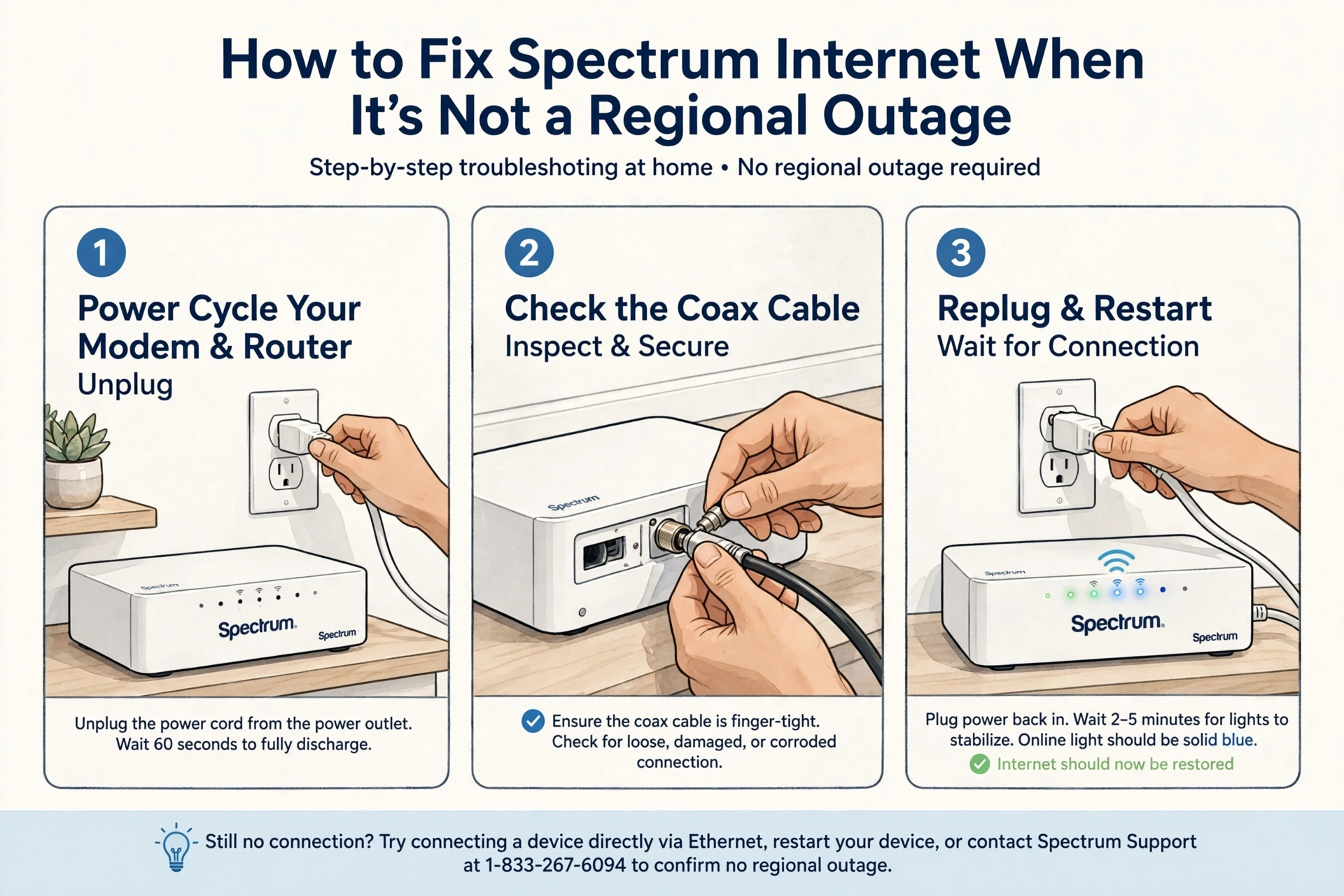
If that doesn’t bring you back, check the physical line before you call anyone. Make sure the coaxial cable is finger-tight at both the wall and the modem. Look for sharp kinks, crushed spots, or a connector that wobbles. If you have a splitter that feeds a TV box and a modem, bypass it temporarily and connect the modem directly to the wall jack. Old or corroded splitters are one of the most common causes of intermittent signal loss and are often overlooked.
One mistake to avoid is repeatedly hitting reset. That can force your modem into a long re-provisioning cycle and make the outage seem longer than it is. If you can access your modem’s diagnostic page at 192.168.100.1, look for repeated T3 or T4 timeout errors in the log. Those indicate upstream noise on the line to your home – a problem no reboot can fix. That’s when you need a technician to check the tap at the pole.
Why Is Spectrum Not Working? The Most Common Causes
When it’s not your equipment, a Spectrum outage is usually caused by physical damage or maintenance on its hybrid fiber-coaxial network.
Fiber runs to a node in your neighborhood, then coax runs to each house. Most major outages come from a cut somewhere on that path – construction crews cutting fiber, a tree branch taking down a line during a storm, or a vehicle hitting a utility pedestal. Those require a field crew to physically repair the line.
The second cause is planned maintenance. Spectrum schedules overnight work to upgrade nodes and add capacity. Service may drop completely for a short window and then return on its own. These are typically brief and happen in the early morning hours.
The third cause is harder to diagnose from home. A neighborhood node can get overloaded during peak evening hours or a piece of hardware at the local hub site can fail. Those failures create the frustrating pattern where service comes and goes – ten minutes online, ten minutes offline – until the hardware is replaced or traffic subsides.
How to Report a Spectrum Outage and Find the Restoration Time
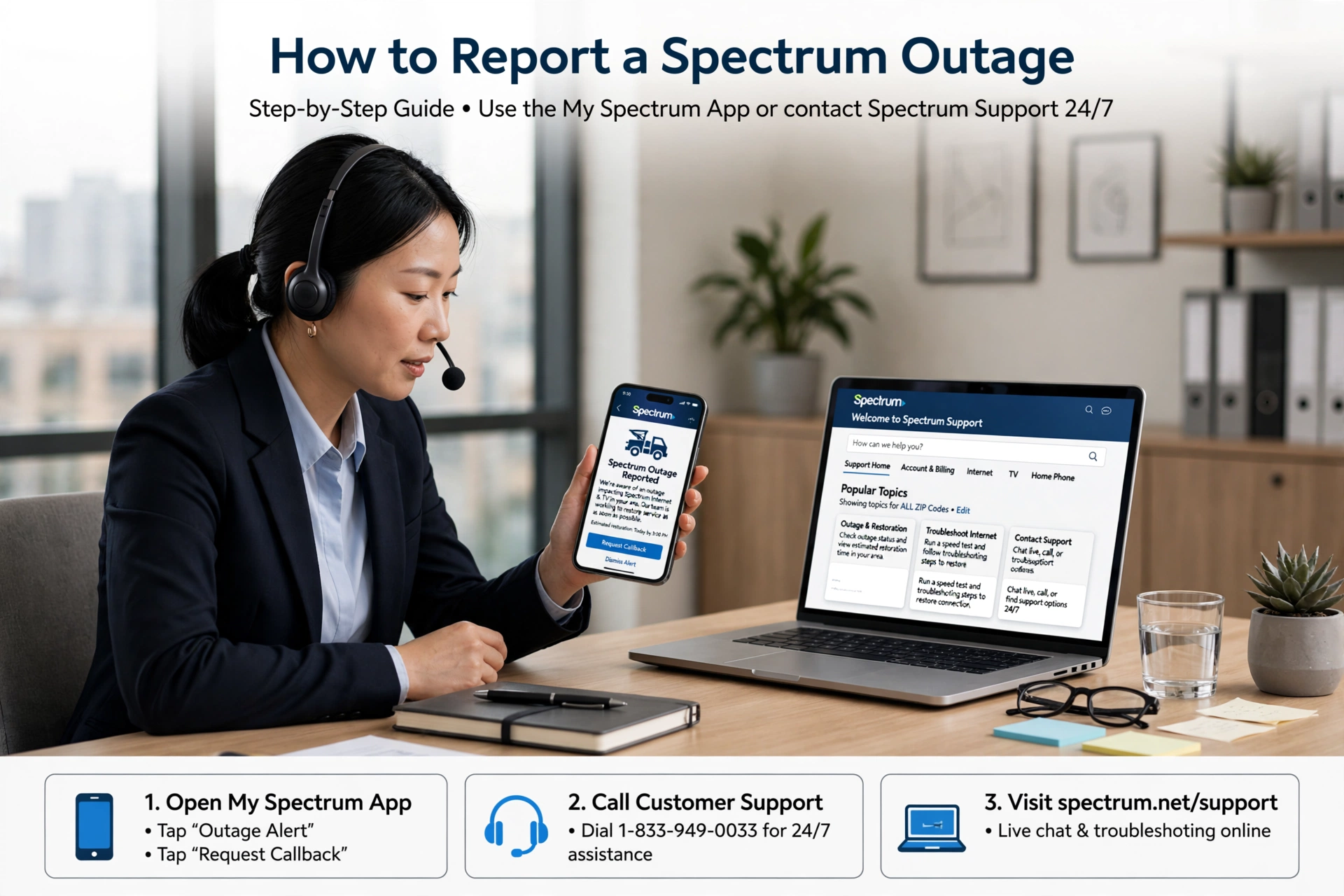
You can report an outage and get restoration updates fastest through the My Spectrum App, not by calling.
Go to Services, tap Internet, and you’ll see the outage notice if one exists, along with an option to receive updates. Tapping that automatically flags your address as affected and subscribes you to notifications. According to Spectrum’s official support documentation, the app and the website pull from the same outage management system that agents see, so calling in will give you the same automated update that’s already in the app.
Don’t expect a precise estimate in the first hour. Early on, you’ll see a general message like “Crews are working to restore service as quickly as possible.” The estimate becomes specific once a field team is on site and has identified the cause. That’s why the time in the app can shift from a vague window to something like “by 3:30 PM ET” and then change again. While you wait, if you need to work, switching your phone to cellular and using it as a hotspot is often the most reliable backup.
Will Spectrum Give You Credit for an Outage?
Yes, Spectrum offers prorated credit for qualifying outages, but you have to request it. It is not applied automatically.
Under Spectrum’s current policy as listed on its support site, you may be eligible if you experience an interruption lasting four hours or more that is due to a Spectrum network issue. Outages caused by a power failure at your home, severe weather knocking out power to your house, or your own router are not covered.
Wait until service is fully restored before requesting it. Then go to Billing in the My Spectrum App or start a chat at spectrum.net and ask specifically for an outage adjustment. Have the date and approximate duration ready. If the outage was logged in their system for your service address, the credit is typically approved quickly. If you’ve had several shorter outages across a week, ask the agent to check your modem’s connection history for drops – those are logged and can support your request even without a single long outage.
Read More: CMF Clip Pro Price, Release Date, Specs & Features & The $99 Open-Ear Earbuds Explained
What to Do If Spectrum Outages Keep Happening
An occasional outage is normal for cable internet. Weekly outages are not.
If this is becoming a pattern, start a simple log. Note the date, time, and duration, and take a quick screenshot of the app banner or your modem lights. That log gives you leverage with support.
When you contact Spectrum, ask them to look deeper than a reboot. Ask them to review your modem logs for T3 and T4 errors and to check your signal levels at the neighborhood tap. That tells you whether the problem is inside your home or on the line from the street. Request a technician visit and ask them to test signal at the pole and replace any old connectors or weathered coax.
If the technician confirms the issue isn’t in your house but at the node level, ask for the issue to be escalated to the maintenance team for node monitoring. Some neighborhoods need a capacity upgrade when too many homes draw heavily at once. Documenting recurring issues and requesting escalation is how those upgrades get prioritized.
FAQ
How do I check if Spectrum is down in my area by ZIP code?
The most accurate method is logging into your Spectrum account on spectrum.net or in the My Spectrum App with your service address. The system checks the node serving your specific home, not just your ZIP. Third-party sites that let you search by ZIP only show crowd-sourced reports for that area, not official Spectrum status for your modem.
How long do Spectrum outages usually last?
Most minor Spectrum outages clear in one to two hours. Larger outages tied to fiber damage, a downed pole, or severe weather often run four to eight hours. In rare cases with major infrastructure damage, restoration can take longer. The most accurate estimate appears in the app after a field crew arrives on site.
Why does my Spectrum internet keep going out every day?
Daily brief outages are usually caused by low signal levels, a damaged coaxial cable, loose or corroded connectors, an overheating modem, or an overloaded neighborhood node. If rebooting fixes it temporarily but it returns the next day, it’s likely a signal issue that requires a technician to inspect the line from the street to your modem.
More: WhatsApp Business Message Folders How to Create and Organize Chats Like Folders
