


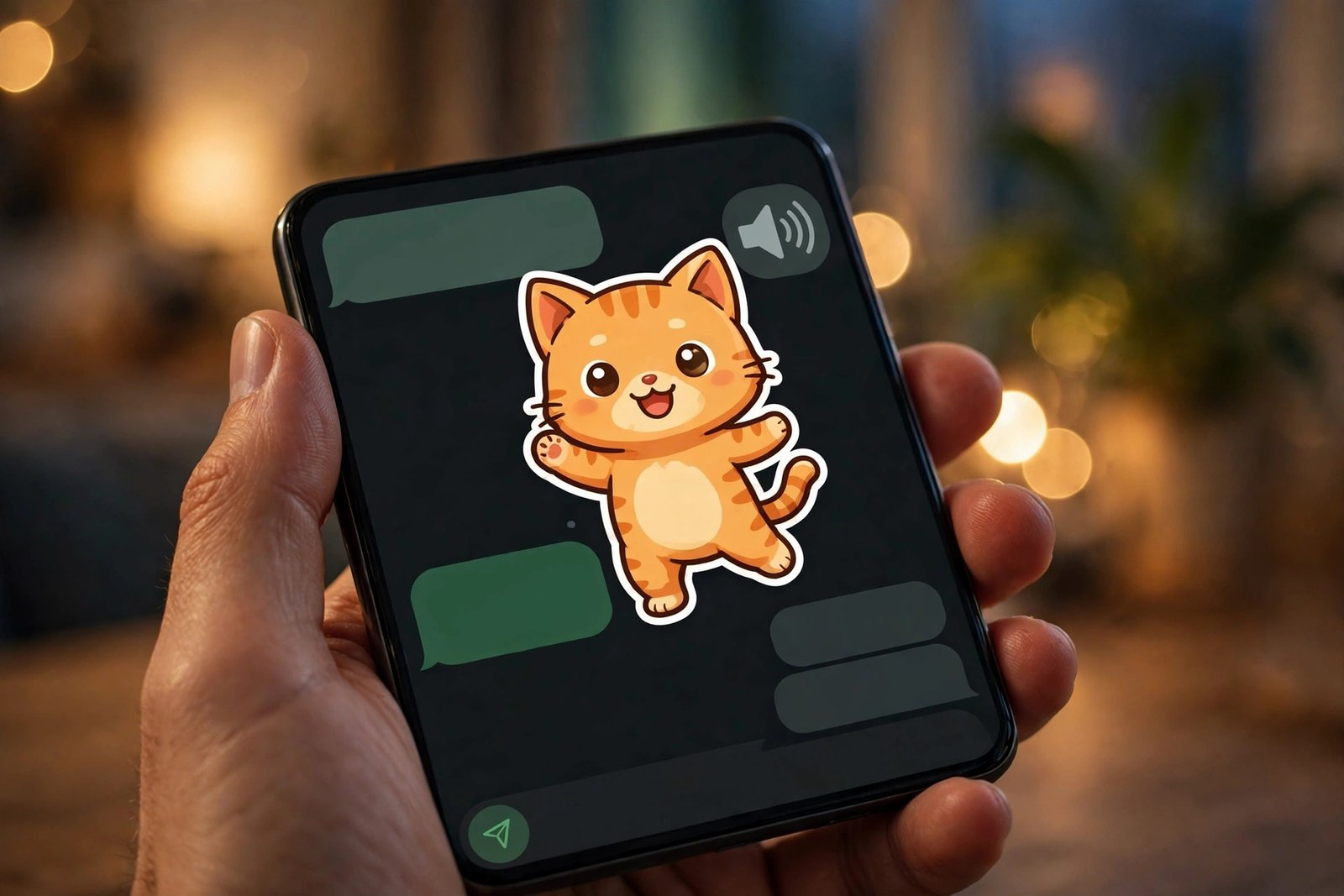
WhatsApp is giving its stickers a voice. The messaging app has started rolling out sound stickers on Android, a new sticker format that plays a short audio clip when the recipient taps it. The feature is reaching some beta testers now through WhatsApp beta for Android version 2.26.47.1, and it turns the humble sticker into something closer to a tiny video message — moving pictures plus sound, sent in a single tap.
It is the latest step in a fast-moving month for WhatsApp’s expressive features. In the past two weeks alone, the app has expanded its text stickers with new designs, started testing sticker reactions on messages, rolled out a dual camera mode, and brought view-once text messages to iPhone beta users. Sound stickers continue that same direction: WhatsApp wants chats to feel less like plain text and more like a conversation you can see and hear.
What are sound stickers?
A sound sticker is exactly what the name suggests: a sticker with an audio track attached to it. Until now, WhatsApp stickers have been silent. Static stickers are still images, and animated stickers move, but neither has ever produced a sound. Sound stickers add a third dimension. The animation plays like any other animated sticker, but a small audio icon on the sticker tells the recipient there is sound attached — and tapping it plays the clip.
The idea is not entirely new to messaging. Other chat apps have offered audio stickers for some time, and WhatsApp users previously had to rely on third-party sticker-maker apps to get anything similar. What is new is that WhatsApp is now building the format directly into the app, with a creation flow that needs no extra downloads and keeps the audio protected by the same encryption as the message itself.
According to WABetaInfo, which first spotted the rollout, WhatsApp had been developing the format for weeks before this release. The feature tracker announced sound stickers as in development in its report on WhatsApp beta for Android 2.26.41.3, describing a sticker format that would let users attach a sound to a sticker created from a video. That development work has now turned into a live rollout, with the feature appearing for some users on beta version 2.26.47.1 from the Google Play Store.
How to create a sound sticker on Android
Creating a sound sticker starts in a place WhatsApp users already know: the sticker keyboard. Open any chat, tap the sticker icon, and choose the “Create sticker” option. WhatsApp then opens a new screen where you pick a video from your phone’s gallery. The app converts the video into an animated sticker automatically, just as it already does for regular animated stickers.
The new part appears at the top of the sticker editor. A new audio button sits there, and tapping it opens an “Add sound” screen where the sticker gets its voice. From that screen, you can refine the sound sticker before sending it, choosing which audio track to attach and how the final sticker should sound.
The creation flow is deliberately simple. There is no separate sticker-maker app to install, no file conversion to manage, and no export step. Pick a video, add a sound, send the sticker. That simplicity matters, because it is what could take sound stickers from a novelty for power users to something ordinary people use every day — a birthday clip with a voice note attached, a reaction video with a sound effect, or a favourite moment with its original audio intact.
What audio can you add to a sound sticker?
WhatsApp offers several ways to give a sound sticker its audio, and the choice is yours at creation time. If the video you picked already has the perfect audio — a laugh, a song snippet, a spoken line — you can keep the original audio exactly as it is, without replacing it.
If the original audio does not fit, you can choose a preset sound effect from a collection available on the “Add sound” screen. These built-in sounds give a sticker its punch without any extra work, and they are the quickest way to make a sticker feel complete.
For more control, you can import an audio track from the Files app on your phone, attaching a specific sound you already have saved. And if none of those options is right, you can record a voice note directly in the editor and attach that as the sticker’s sound. That last option is the most personal of all: a sticker that literally speaks in your own voice.
The range of options shows how WhatsApp is thinking about the feature. It is not just a sound effect picker. It is a small creative tool, closer to the video editors inside the app than to the old sticker packs, and it gives users a reason to make stickers rather than only download them.
How sound stickers appear and play in a chat
When you send a sound sticker, the recipient sees it in the chat with a small audio icon on top of it. The icon is the signal that this sticker carries sound, so the recipient knows before tapping that there is more to it than the animation.
Sound stickers do not play their audio automatically. To avoid interrupting conversations — or embarrassing anyone in a quiet room — WhatsApp mutes them by default. The recipient has to tap the audio icon to hear the sound. Once tapped, WhatsApp plays the audio track three times in a loop before stopping, giving the recipient a chance to catch it without the sound repeating endlessly.
That muted-by-default choice is an important design decision. Autoplaying audio in a busy group chat would quickly become annoying, and WhatsApp has clearly chosen to let the recipient stay in control. The sticker still animates on its own, so it works as a normal animated sticker even if the sound is never played — the audio is a bonus, not a requirement.
Privacy is handled the way WhatsApp handles everything else in a chat. Both the sticker and its audio track are secured with end-to-end encryption, according to WABetaInfo, so the sound you attach is protected in the same way as the message around it. Nobody outside the conversation — not even WhatsApp — can listen to it.
How sound stickers differ from standard stickers
The difference between sound stickers and the stickers WhatsApp already offers is simple but significant. Standard stickers, whether static or animated, communicate only through an image. They can be funny, expressive, or cute, but they are silent by nature. Sound stickers break that silence.
An animated sticker of a dancing pet is charming. The same sticker with its original audio — the music, the bark, the laugh — is a small moment, replayed. A sticker of a friend’s reaction becomes a voice message and a picture at the same time. The format borrows the immediacy of a voice note and the shareability of a sticker, and puts them together in one message.
That combination is why sound stickers could matter more than they first appear. Stickers are already one of the most-used expressive features in WhatsApp, especially in group chats, where a well-timed sticker can say more than a paragraph. Adding sound gives the most active sticker users a new way to stand out, and it gives WhatsApp a feature its rivals have had for a while — now built in, without third-party apps.
WhatsApp’s sticker push keeps accelerating
Sound stickers do not arrive in isolation. They are the latest in a rapid series of sticker and expression updates that WhatsApp has shipped through its beta programme this month.
Earlier in November, WhatsApp doubled its text sticker designs for Android beta testers, growing the collection from five designs to ten and adding a new creation menu to make the stickers easier to find. Around the same time, the app began testing sticker reactions, letting users react to a message with a sticker from their own collection — up to 20 stickers on a single message, far beyond the single emoji reaction most people are used to.
The Contacts tab arrived on Android beta earlier too, giving users a dedicated place to see who is online and manage their contacts, and WhatsApp Events gained the ability to invite people who do not even have WhatsApp installed. Each of these is a small change on its own, but together they show a clear pattern: WhatsApp is rebuilding the chat experience around expression, discovery, and richer ways to share.
Sound stickers fit that pattern neatly. They take the app’s most playful feature and make it more expressive, in the same way sticker reactions made emoji reactions more personal. And because the creation flow reuses the existing sticker editor, the learning curve is almost zero for anyone who has ever made a sticker before.
Who gets sound stickers first?
For now, sound stickers are limited to some beta testers on Android. The feature was spotted in WhatsApp beta for Android version 2.26.47.1, available through the Google Play Store, but installing that version does not guarantee the feature will appear. WhatsApp is rolling it out gradually, so even users on the latest beta may not see the audio button in the sticker editor straight away.
If the audio button does not appear, there is nothing to fix on your phone — the feature simply has not been enabled for your account yet. According to WABetaInfo, it should become available to more accounts over the coming weeks as the rollout widens. WhatsApp has not announced when sound stickers will reach everyone, or when the feature will leave beta and arrive in the stable version of the app.
There is also no word yet on iPhone. The rollout reported so far covers Android only, and WABetaInfo’s report does not mention an iOS version or a timeline for one. That is normal for WhatsApp, which often tests a feature on one platform first — view-once text messages, for example, appeared on Android beta about two weeks before reaching iPhone beta users. If that pattern holds, an iOS version of sound stickers may follow, but nothing has been confirmed.
To check whether you have the feature, update WhatsApp from the Google Play Store to the latest beta version, open any chat, tap the sticker icon, and choose “Create sticker”. If a new audio button appears at the top of the editor after you pick a video, sound stickers are live on your account. If it does not, keep the app updated and wait for the rollout to reach you.
What happens next
The next step is a wider beta rollout. Over the coming weeks, WhatsApp is expected to enable sound stickers for more Android beta testers, ironing out any issues before the feature reaches the stable app. That is the usual path for WhatsApp features: a limited beta first, a gradual expansion, and then a public release once the company is confident the feature works well at scale.
What to watch for is whether the iOS beta picks up the feature next, and whether WhatsApp adds sound stickers to the sticker packs and store, rather than only to stickers users create themselves. A library of ready-made sound stickers — the same way the app already offers sticker packs — would make the feature far more visible, and would likely be the step that takes it from a beta curiosity to something most users encounter.
For now, Android beta users who have the feature can start experimenting: turn a favourite video into a sticker, add a voice note, and send it to a friend. The sticker that talks back has arrived — quietly, for now, and only for some. But if WhatsApp’s recent pace is any guide, it will not stay quiet for long.
Frequently Asked Questions
What are WhatsApp sound stickers?
Sound stickers are a new sticker format on WhatsApp that plays a short audio clip when the recipient taps the sticker. They combine an animation with an audio track, so a sticker can move and make sound at the same time. Standard stickers are silent; sound stickers add audio as a third dimension.
How do I create a sound sticker on Android?
Open any chat, tap the sticker icon, and choose “Create sticker”. Select a video from your gallery and WhatsApp will convert it into an animated sticker. Then tap the new audio button at the top of the editor to open the “Add sound” screen, where you can keep the video’s original audio, pick a preset sound effect, import audio from the Files app, or record a voice note.
Which WhatsApp version do I need for sound stickers?
Sound stickers were spotted in WhatsApp beta for Android version 2.26.47.1, available from the Google Play Store. The feature is rolling out gradually to some beta testers, so updating to that version does not guarantee it will appear immediately. It is not yet available in the stable version of WhatsApp.
Do sound stickers play sound automatically?
No. Sound stickers are muted by default so they do not interrupt conversations. The recipient sees a small audio icon on the sticker and must tap it to play the sound. Once tapped, WhatsApp plays the audio track three times in a loop and then stops.
Are sound stickers available on iPhone?
Not yet, as far as current reports show. The rollout reported by WABetaInfo covers Android beta only, and there is no confirmed date for an iOS version. WhatsApp often tests a feature on Android first and brings it to iPhone later, as it did with view-once text messages, but no iOS timeline for sound stickers has been announced.
Are sound stickers end-to-end encrypted?
Yes. According to WABetaInfo, both the sticker and its attached audio track are secured with end-to-end encryption, the same protection WhatsApp applies to messages, photos, and voice notes. Nobody outside the conversation can access the sticker or its sound.
Sources: WABetaInfo (November 25, 2026); Lamatto (November 24, 2026).
